HamStream is a DX companion tool for ham radio operators. The moment a station is spotted you see their callsign, country, distance, bearing and QRZ profile — automatically, right in front of you. No alt-tabbing. No interruption. Just operate.
The moment a station is spotted you know exactly who they are, where they are, and how far the signal has travelled — without touching a keyboard. Every piece of data you need to decide whether to call, right there on screen. If you also stream, your audience sees it all too.
Connect to any AR-Cluster, CC Cluster, or DX Spider server of your choice — just enter the hostname. The moment a station is spotted, their callsign, country, distance, bearing, and band appear instantly — no browser tab, no alt-tab, just there.
HamStream fetches the spotted operator's name, photo, city, grid square, licence class and DXCC entity from QRZ automatically. Everything you need to decide whether to call, in one card.
Exact distance in km and miles, bearing from your QTH, and a live great-circle minimap showing the propagation path — so you know immediately how far the signal has travelled.
Star any callsign. The moment they're spotted on any frequency or band, HamStream fires an immediate alert — so you never miss a friend, a rare entity, or a sought-after prefix.
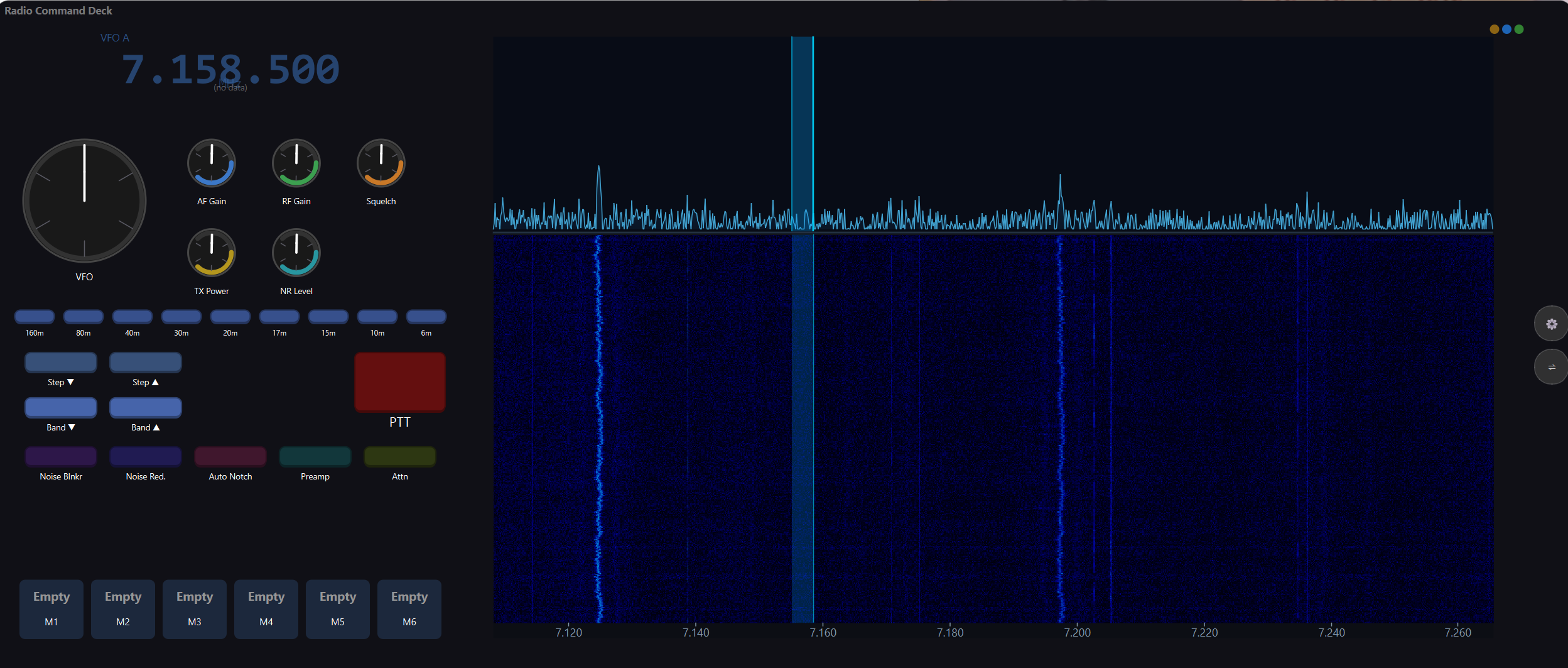
Connects to your rig via serial CAT, HAMLIB, or FlexRadio SmartSDR. Reads VFO A & B, mode, filter, AGC, S-meter and PTT in real time — always in sync with what the radio is doing.
Live waterfall synced to your radio's centre frequency. Supports real SDR data or a built-in simulation. Spot frequencies are marked directly on the ruler — find signals in seconds.
Want to share it with an audience? Add HamStream as a Browser Source in OBS or StreamLabs. Everything on your screen — DX spots, operator info, frequency, waterfall — goes live automatically.
If you stream, HamStream also shows live viewer count, gift notifications, follow alerts, and Twitch chat frequency requests — so your audience feels part of the contact.
These interactive mockups show exactly what HamStream puts in front of you — live waterfall, real-time frequency, DX spots and operator data as they happen. This is what you see at your desk while you operate.
Want to see more? Browse real screenshots from every feature area.
Any radio with a CAT/CI-V/serial port is supported. If it's not in the list, it will likely still work — just let us know.
Any radio supported by HAMLIB — over 600 models including Elecraft, Ten-Tec, Alinco, Jupiter, and more. Run rigctld locally and point HamStream at it.
Connect to any DX cluster server worldwide. HamStream monitors spots in real time and fires a callsign card when a station is spotted within your chosen frequency window. Supports multiple simultaneous cluster connections.
When a station is spotted, HamStream automatically looks them up on QRZ.com and pulls their profile photo, full name, city, DXCC entity, grid square, and licence class — displayed in the spot card.
Display your live viewer count in the overlay, show gift notifications with the sender's name, fire follow alerts, and display chat messages as frequency requests — all styled to match the HamStream aesthetic.
Monitor your Twitch chat for frequency requests. When a viewer types a frequency in chat, it appears as an overlay card for you to acknowledge. Follows and subscriptions can also be surfaced as alerts.
Download and run the Windows installer. HamStream runs as a small local server on your shack PC — no cloud required, no account, your data stays on your machine.
Select your radio make, model and COM port in Settings. Click Test Connection to confirm. Works with Yaesu, Icom, Kenwood, FlexRadio and any CAT rig.
Enter your nearest cluster server. HamStream connects automatically and monitors spots in real time, filtered to your frequency window and your callsign's QTH.
Open the display in your browser. DX spots appear the moment they're posted — callsign, country, distance, bearing and QRZ profile, all fetched automatically.
Also streaming? Add http://localhost:5000/display as a Browser Source in OBS and everything appears on screen for your audience too.
One price, one licence — whether you use it purely as a DX companion at your desk, as a streaming overlay, or both. Updates are free for the first year, then just £5/year if you want them.
Secure payment via PayPal
Existing licence holders only
Your software keeps working exactly as before — forever. The £5/year is only for downloading new updates. If you're happy with your current version, you never need to pay again.
Run HamStream on your shack PC, a portable laptop, and a spare machine. All three are covered by one £19.99 licence, each tied to its Machine ID.
Each download is issued to your callsign and verified against your licence key. Shared installer files are useless without a matching key — and each key only works on its registered Machine ID.
Windows 10 and Windows 11 (64-bit). The display overlay is a browser page, so your viewers watch on any device through your stream.
No. HamStream runs entirely on your local network. Only the DX cluster and QRZ features require internet access, and both are optional.
A free QRZ account is enough for basic lookups. A QRZ XML subscription unlocks photos and full data. HamStream works without QRZ at all — the spot card just shows less detail.
Yes. Without a cluster connection, HamStream still shows your frequency, mode, band, S-meter, and radio feeds in real time. The spot card simply doesn't appear.
If your radio supports CAT control (serial or CI-V) it will very likely work. The HAMLIB backend covers hundreds of additional models. Get in touch and we'll confirm.
Open HamStream, go to Settings → Licence. Your Machine ID is displayed there — copy and paste it into the licence portal when purchasing.
Nothing changes for the software you have installed — it continues to work exactly as before, forever. You just can't download new versions until you renew for £5. Renew any time at the Downloads page.
Not at all. Many operators run HamStream purely as a DX companion — real-time cluster spots, QRZ lookups, distances and propagation paths on their screen while they operate. Streaming is an optional extra, not a requirement.
No. Each installer download is signed to your callsign and requires a valid licence key + matching Machine ID to activate. A copy shared with someone else will not activate on their machine.